Multi-agent generative AI systems use multiple specialized AI agents working together to handle complex, multi-faceted tasks that exceed the capabilities of any single model. By combining agents with different skills or modalities (for example, language, vision, audio, video), these systems can tackle tasks in parallel or sequence, yielding more robust results. Recent research shows that multi-agent collaboration can significantly improve success rates on complex goals (up to 70% higher vs. single-agent approaches). There are different patterns for such multi-agent collaborations. Whether it’s a manager-agent delegating specialized tasks (Agent as tools), a swarm of brainstormers (Swarms), a carefully wired graph of expert agents (Agent Graph), or a structured pipeline (agent workflow), the right design pattern combined with the right tooling will significantly enhance the system’s effectiveness.
The challenge with multi-agent systems, however, lies in their computational demands. Modern multi-agent applications can issue thousands of prompts per user request as agents brainstorm, critique, and refine one another’s answers. This intensive workflow creates two critical requirements: high throughput (tokens-per-second) and cost efficiency (dollars-per-million-tokens). This is precisely where Amazon Nova becomes a very suitable foundation model (FM) choice for multi-agent architectures:
- Blazing throughput: Nova Micro streams over 200 tokens per second with sub-second first-token latency, keeping even large swarms of agents responsive to end-users.
- Consistent structured output: With the latest constrained decoding implementation, Amazon Nova models can produce consistent structured outputs and improve tool-calling accuracy.
- Ultra-low cost: Teams can afford the token volume that multi-agent reasoning demands with the low costs of Nova Micro and Nova Lite.
Because every agent call stays inexpensive, developers are free to let orchestration frameworks such as the open-source Strands Agents SDK spin up task-specific Nova agents, retry or cross-verify answers, and iterate until they converge on the best result—all without runaway inference bills.Conversely, multi-agent generative AI systems unlock the full potential of Amazon Nova through:
- Iterative self-improvement: Agents can ask Nova to reflect on its own answer, critique weaknesses, and regenerate often lifting success rates by double-digit percentages without any fine-tuning.
- Redundancy and fail-over: Running several Nova agents in parallel (such as consensus or swarm patterns) increases answer quality and resilience—one weak response is out-voted or retried automatically.
In this post, we explore four key collaboration patterns for multi-agent, multimodal AI systems – Agents as Tools, Swarms Agents, Agent Graphs, and Agent Workflows – and discuss when and how to apply each using the open-source AWS Strands Agents SDK with Amazon Nova models. As an agent orchestration framework, Strands is built to be lightweight and easy to learn – it uses only a handful of concepts and leans on Python’s native structures for composing agents. Another strength is its model-driven approach: Strands encourages you to let the FM figure out the sequence of steps (the agent loop consults the FM for what to do next rather than hardcoding a flow). This harnesses the powerful reasoning of FM for orchestration decisions, reducing the amount of fixed code logic. Each of the following pattern sections provides a conceptual overview with a diagram, real-world use cases, pros and cons, and code examples to illustrate implementation.
Agents as Tools pattern
The Agents as Tools pattern wraps specialized AI agents as callable tools that a primary orchestrator agent can invoke. This creates a hierarchical team structure: a top-level agent acts like a manager, delegating specific queries to expert sub-agents and then integrating their outputs. Each tool agent focuses on a particular domain or modality, while the orchestrator decides which tool to call for each part of the user’s request. This setup mimics a human scenario where a team lead consults various specialists instead of trying to do everything alone. By offloading work to expert agents, the orchestrator can provide more accurate and multi-faceted responses than a monolithic agent.
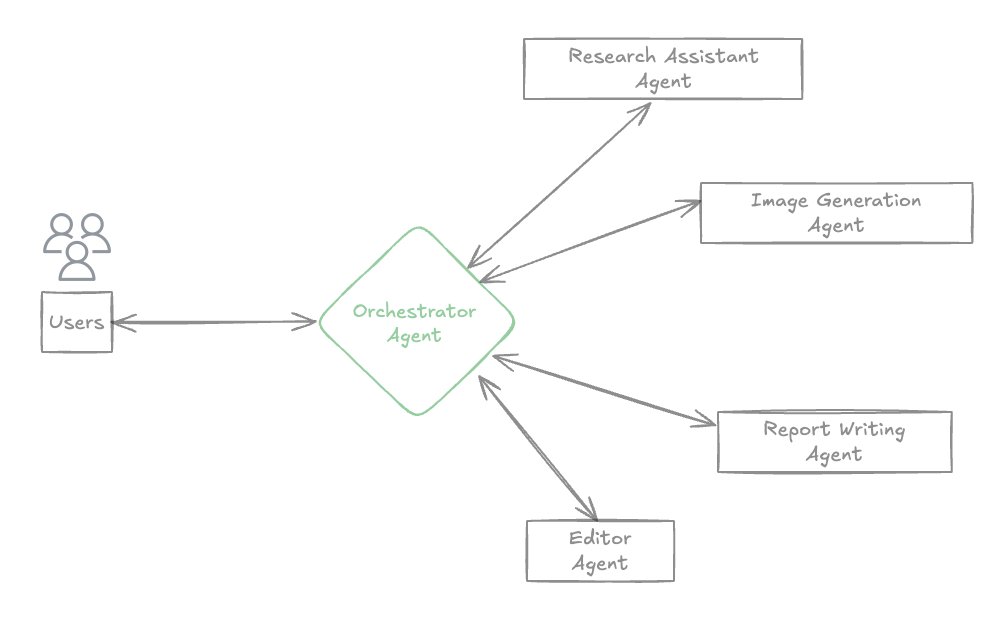
Figure 1: Multimodal Agents as Tools – An orchestrator agent (manager) uses specialized “tool” agents (experts) to handle different sub-tasks, then aggregates their results into a final answer.
Use cases, pros, and cons
This pattern is ideal when a user query naturally breaks down into distinct subtasks requiring different expertise. For instance:
- A multi-domain assistant that answers questions involving, say, travel planning, product recommendations, and research–the orchestrator can route portions to a Trip Planner, Product Recommender, or Researcher agent respectively.
- Multimodal tasks where one agent handles image or speech input while another handles text (the orchestrator chooses the right modality-specific agent as a tool).
- Any system requiring specialized skills or tools (for example, an educational tutor agent invoking a code execution agent for programming questions, or a customer service bot calling a database-query agent).
Pros:
- Separation of concerns: Each agent has a focused role/expertise, making the overall system easier to understand and extend.
- Modularity: Specialists (tools) can be added or updated independently without affecting others, as long as the orchestrator’s interface to them remains consistent.
- Hierarchical decision-making: The orchestrator provides a clear chain of command, deciding which expert to use for each task, which can improve reliability.
- Optimized performance: Each agent can have a tailored prompt, model, or tool for its specific task, potentially yielding better accuracy or efficiency than a generalist agent.
Cons:
- Orchestrator complexity: The top-level agent must correctly identify which tool agent to invoke and how to integrate results. This requires careful prompt engineering or routing logic (risk of errors if the orchestrator misinterprets the query).
- Single point of failure: The orchestrator agent becomes a critical component; if it fails or gives a bad decision, the whole system’s output may suffer.
- Context sharing and integration: Specialized agents typically receive only the information explicitly included in their specific queries, limiting their access to broader context. Therefore, the orchestrator must consolidate outputs from different agents. Ensuring a coherent final answer (avoiding contradictions or gaps) can be challenging if the specialists work in isolation.
Strands SDK example
The Strands Agents SDK makes it easy to implement Agents as Tools using the @tool decorator to turn python functions into callable tools. Each tool-agent is essentially an LLM (or other service) with its own prompt or instructions and is exposed as a callable function. When invoked, the specialist agent receives only the information passed by the orchestrator (typically the specific subtask prompt) and returns its output. The orchestrator then uses that output in context, possibly calling further tools or producing a final answer. In the following code, we define a specialized research assistant agent as a tool, then create an orchestrator that uses it (along with other domain-specific agents) to answer a query with either indexed knowledge or web search information:
In a similar way, you can also define other tool agents, for example an editor_assistant or image_creation_assistant, each with their own system prompt and tools for their domain. Once the specialist agents are defined, the orchestrator agent can include them in its tool list:
In this example, the orchestrator will delegate parts of the query to the relevant specialists – for example, use research assistant then pass that context to the editor assistant to produce content based on the provided context, and finally synthesize a combined answer for the user. The Agents as Tools pattern enables a powerful composition of experts, all managed through simple function calls in Strands.
The complete code example and solution diagram of this multimodal email writer assistant that is ready to run and deploy is provided in this Github repository.
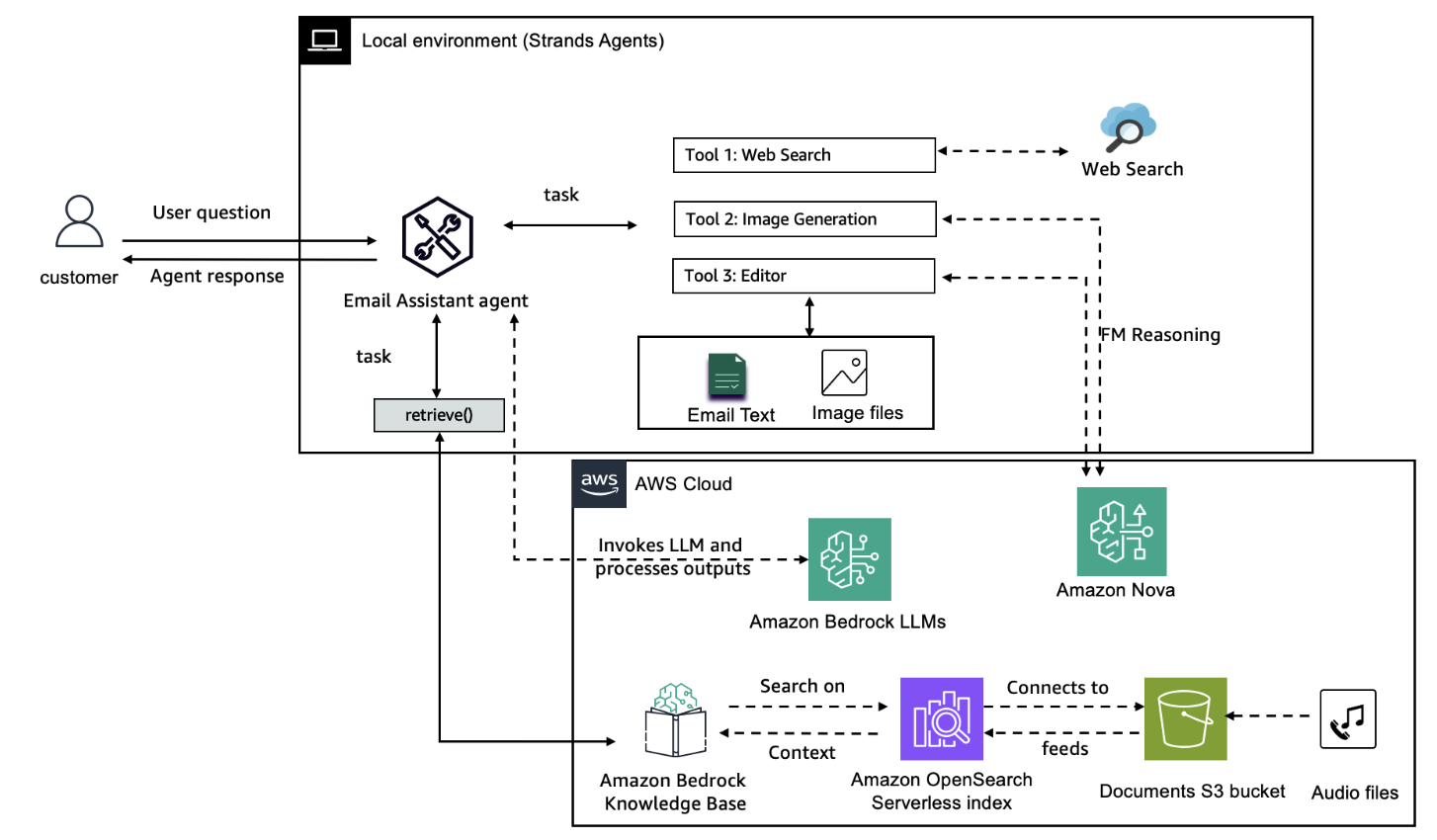
Figure 2: Solution diagram of the multimodal email writer assistant with Agents as Tools pattern.
See the agents-as-tools documentation for more information.
Swarm pattern
The swarm pattern involves a group of peer agents working together on a task, exchanging information directly and iteratively. This is inspired by swarm intelligence in nature (like ant colonies or bee swarms) where many simple units interact to produce complex, emergent behavior. In an AI swarm, each agent might approach the problem from a different perspective (or with different data or mode) and share its findings so that other agents can refine their own results. No central controller is micromanaging the process; instead, coordination is decentralized and often happens through a shared memory or message space. The swarm thus collectively explores the solution space and converges on an answer through multiple rounds of communication.
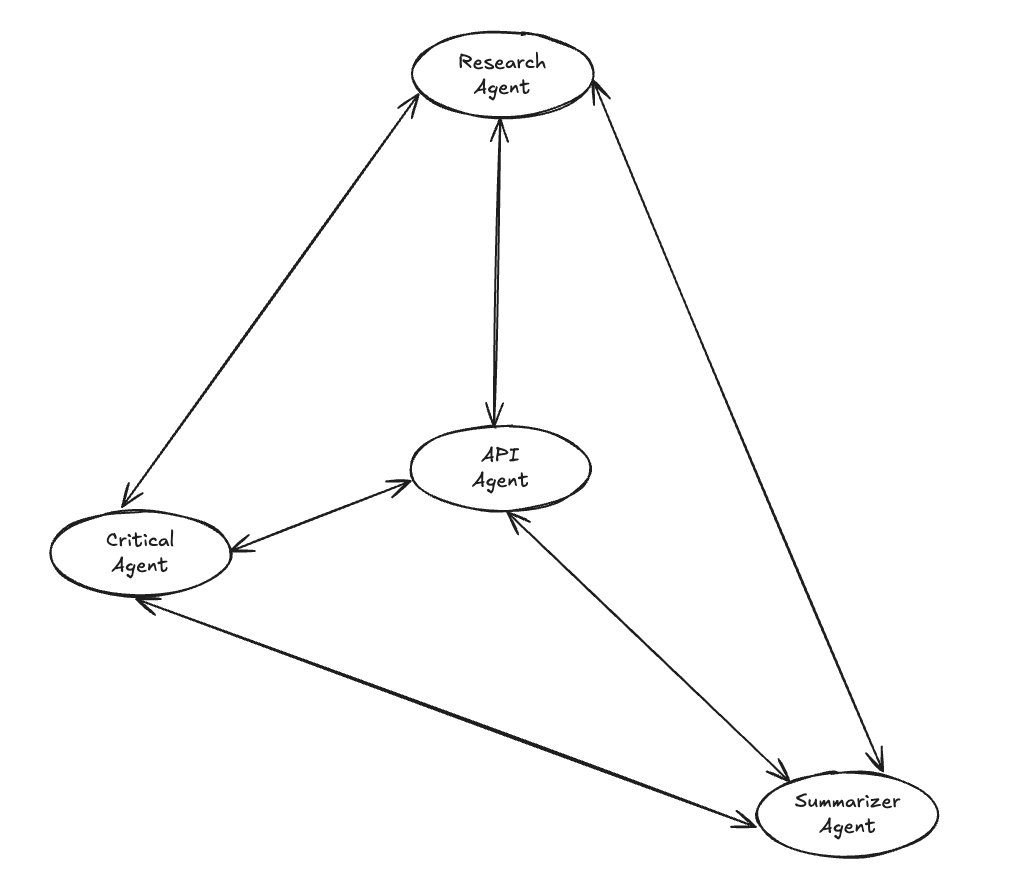
Figure 3: Swarms Agents – A decentralized mesh of agents (e.g. Research, Creative, Critical, Summarizer) all communicate with each other to collaboratively solve a problem. There is no single orchestrator; intelligence emerges from agents sharing and refining ideas collectively.
Key characteristics of swarms include information sharing, agent specialization, redundancy, and the potential for emergent intelligence beyond the sum of individual agents. Importantly, control is decentralized–there isn’t a single agent deciding roles for others. Agents follow relatively simple local rules (“share my result with others, then revise my answer after seeing others’ results”) and complex global behavior emerges from these interactions. For example, one agent might focus on creative brainstorming, another on factual accuracy, another on critiquing solutions, and a final one on summarizing; together, through two or more rounds of exchanging ideas, they produce a balanced and well-vetted outcome.
Use cases, pros, and cons
Swarm patterns are useful when a problem benefits from diverse perspectives or parallel exploration:
- Brainstorming and ideation: Multiple generative agents can propose ideas or solutions in parallel (some might be wild and creative, others more conservative), then collectively refine them. This can yield more innovative results than a single agent’s answer.
- Complex reasoning tasks: Agents can build upon each other’s work through structured handoffs. For example, one agent analyzes a problem, hands off to another for solution design, then to a third for validation and refinement. This sequential collaboration often produces higher-quality results than parallel approaches.
- Multi-stage workflows: Different agents can handle distinct phases of a complex task. In financial analysis, a research agent gathers data, hands off to an analysis agent for insights, then to a reporting agent for final presentation. Each handoff includes context and intermediate results.
- Iterative improvement: Through multiple iterations and handoffs, swarms can progressively refine solutions. An initial draft from one agent gets enhanced by subsequent agents, with each iteration building on previous work within configurable time windows.
- Fault-tolerant processing: With timeout controls and handoff mechanisms, swarms can gracefully handle agent failures. If one agent times out, the swarm can continue with available results or retry with different agents.
Pros:
- Diversity of thought: Each agent can pursue a unique strategy or viewpoint, yielding a richer pool of ideas. The final result can be more comprehensive and balanced by incorporating inputs from all agents.
- Emergent improvement: Through iterative communication, swarms often refine solutions better than a single-pass approach. Agents can correct each other’s errors or build on each other’s partial solutions, leading to high-quality outcomes.
- No single failure point: Since there’s no central orchestrator, the system might be more fault-tolerant – if one agent underperforms, others can compensate (and there isn’t a single agent whose failure collapses the process).
Cons:
- Timeout sensitivity: Aggressive timeout settings might cut off productive work, and loose timeouts can lead to inefficient resource usage if agents get stuck.
- Iteration overhead: Multiple iterations can accumulate costs and latency, especially with large language models, requiring careful balance between quality and efficiency.
Strands SDK example
In the following example, the swarm has three following collaborative agents:
research_agent: finds factual infoanalysis_agent: analyzes live market data via APIwriter_agent: compiles the final answer
This approach eliminates the need for manual coordination code and provides fine-grained control over collaboration patterns. The swarm automatically manages handoffs between agents, tracks conversation history, and confirms that execution completes within specified timeouts. Agents can focus on their specialized tasks while the swarm framework handles the complex orchestration, shared memory management, and fault tolerance mechanisms. The key advantage is that complex multi-agent workflows become as simple as configuring a few parameters, while still supporting sophisticated collaboration patterns through the handoff and iteration mechanism.
The complete code example and solution diagram of a financial assistant swarm agent that is ready to run and deploy is provided in this Github repository.
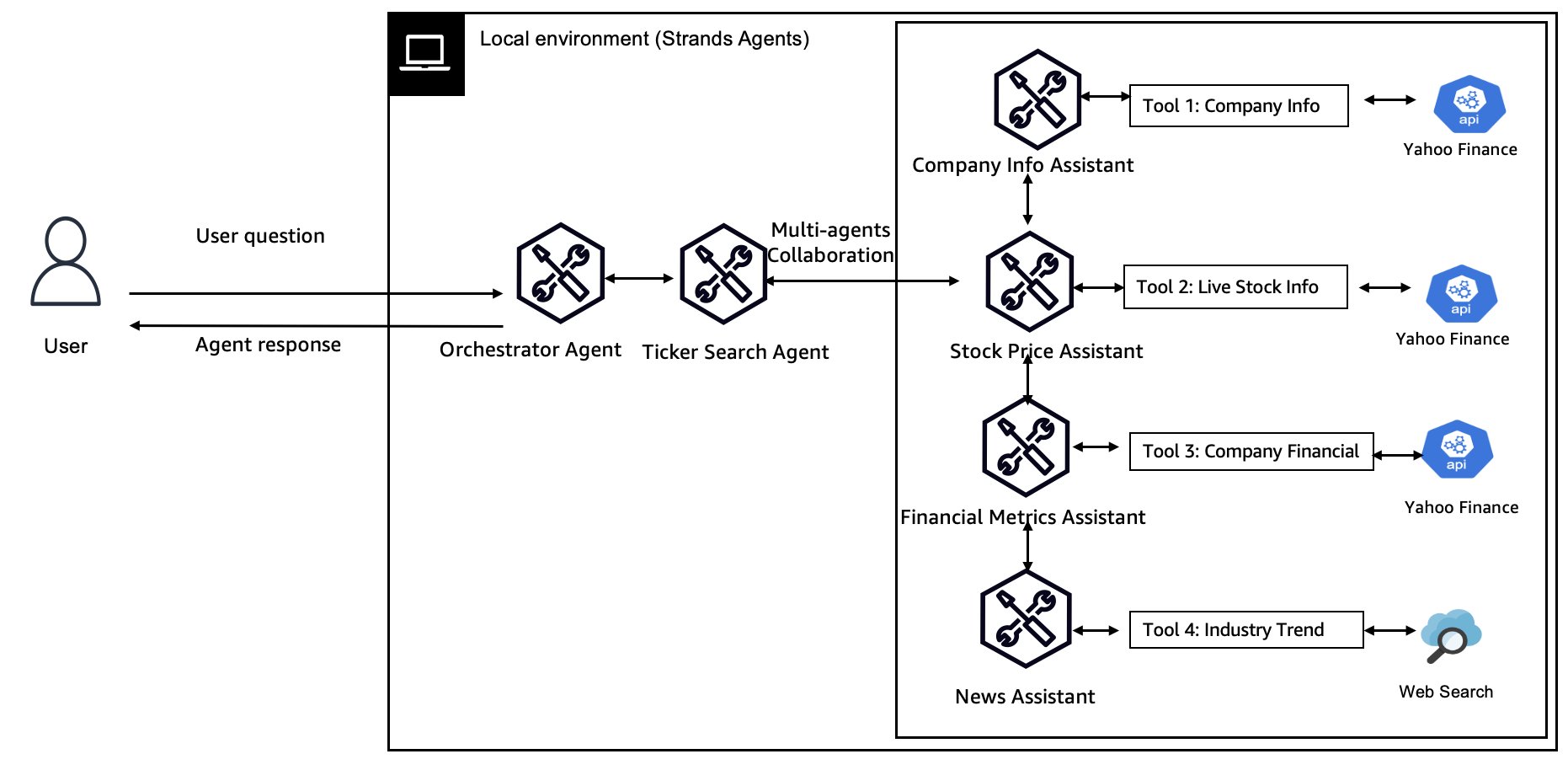
Figure 4: Solution diagram of a financial assistant swarm agent.
See the swarms documentation for more information.
Graph pattern
An agent graph defines a structured network of agents with directed connections that determine how information flows between them. Unlike the free-form mesh of a swarm, an agent graph is usually designed by the developer to fit a specific workflow or organizational hierarchy. Each node in the graph is an agent with a well-defined role, and each edge represents a communication or handoff channel (which might be one way or bidirectional). This pattern helps you enforce precise control over the sequence and direction of inter-agent interactions. For example, you might arrange agents in a multi-level hierarchy: a top-level executive agent breaks a task into parts, passes sub-tasks to intermediate manager agents, which in turn delegate to low-level specialist agents, and results flow back up the chain. Alternatively, you can define a star topology where a central agent coordinates a set of peripheral agents (similar to Agents as Tools, but potentially with feedback loops), or any custom graph topology (tree, acyclic graph) that suits the problem domain.
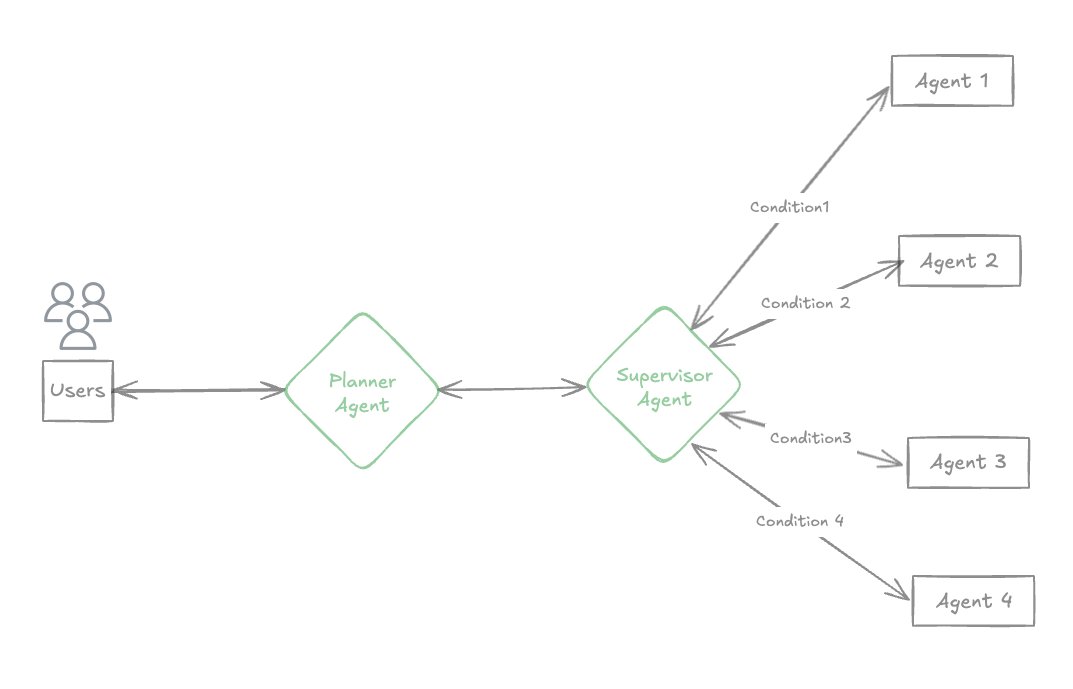
Figure 5: Illustration of a Graph agent pattern.
The agent graph is shown in the following diagram. (Topology Example – Hierarchical): Agents connected in a multi-level graph. The planner agent delegates a query to a robust supervisor agent, and then delegates to mid-level agents Agent 1, Agent 2, Agent 3 and Agent 4; each of those oversees a team of specialized agents. Information flows along directed edges. The branch can incorporate business logic to decide which agent to use based on the conditional edge. The key benefit of agent graphs is predictability and control. By explicitly connecting agents in a graph, developers can verify that a fact-checker agent always validates outputs from a generation agent before they reach the final reporter agent, or that information only flows in approved ways (useful for safety, to prevent certain agents from seeing sensitive data unless needed). This pattern excels when you need custom communication patterns, distinct specialized roles, and fine-grained information flow management.
Use cases, pros, and cons
Agent graph patterns shine in particular when:
- You have complex, multi-stage decision processes, such as an enterprise workflow where a lead agent delegates to separate analysis agents (financial, technical, social impact analysis) and each analysis agent might further delegate to sub-agents. The graph structure can mirror organizational charts or decision trees so that each step’s output is reviewed and integrated at higher levels.
- You need controlled tool access and data flow: Suppose you have certain agents that can call external tools or APIs and others that should not (for security or cost reasons). By structuring the graph, you can isolate tool-using agents and have other agents funnel requests through them.
- To avoid free-for-all communication: If the task requires tight coordination and clear roles, an agent graph is preferable over a swarm. For instance, in a customer support system with multiple agents (billing, technical support, sales), you might not want them all talking to each other arbitrarily. A graph can enforce that all communication goes through a central coordinator or follows defined escalation paths (like a star or tree topology).
Pros:
- Fine-grained control: Developers explicitly define who communicates with whom. This prevents unintended interactions and makes the system’s behavior easier to reason about, such as when you know the Report Aggregator Agent only receives input from the Fact-Checker and Analysis agents and nothing else.
- Context and state management: Graph edges can be thought of as persistent channels–potentially maintaining state or using message queues. This is useful for long-running contexts.
- Predictable execution flow: Unlike a swarm (where timing and order of exchanges are emergent), an agent graph follows a more deterministic flow. This is beneficial for workflows that require deterministic outputs or step-by-step tracking. It’s easier to trace how an input moves through the system using the graph’s pathways.
Cons:
- Design effort: Deciding on the right graph topology can be challenging. You must understand the problem domain well in order to partition tasks and arrange agents effectively. Over-designing the graph might lead to rigidity; under-designing might not reap the benefits of the pattern.
- Less dynamic adaptability: A fixed graph is not as spontaneously adaptive as a swarm. If a query slightly outside the expected pattern comes in, the orchestrated pathways might not handle it gracefully (unless you build in a lot of logic for routing). In contrast, a swarm or tools approach might dynamically adjust by simply trying different tools or agents.
- Latency in deep graphs: If the graph has many levels (like a tall hierarchy), information has to pass through multiple agents sequentially, which can increase latency. Each hop adds overhead. For example, in a three-level hierarchy, a message might flow down through two intermediate agents and then back up–that’s more round trips than a flatter architecture.
Strands SDK example
The GraphBuilder class, available in the Strands SDK, offers a streamlined way to implement agent graph patterns. It handles the complexities of agent communication and network topology management, helping developers focus on agent behavior. It provides built-in support to define graph topologies, messages handling (the mechanism for transferring data) and direction (one-way or bidirectional information flow) between agents. For each agent, developers can implement business logic to handle fallback mechanism and agent response evaluation.
Use the GraphBuilder to define nodes, edges, and entry points for your multi-agent workflows. From this foundation, you can create sophisticated patterns through various combinations:
- Dynamic workflows: Add conditional logic to edges that route based on runtime decisions
- Nested architectures: Embed entire graphs or swarms as nodes within larger graph structures
These examples represent just a fraction of the endless architectural possibilities available when building with graphs in the Strands SDK.
The complete code example of this agent graph that is ready to run and deploy is provided in this Github repository.
See the graphs documentation for more information.
Workflow pattern
The workflow pattern orchestrates multiple agents in a predefined sequence or dependency graph of tasks–much like a classical workflow or pipeline, but with AI agents executing the steps. In this pattern, the emphasis is on task ordering and dependency management: you explicitly break a complex job into a series of discrete tasks assigned to different agents, and define how those tasks depend on each other (some tasks might run in parallel, others must wait for certain outputs). In the workflow pattern, each agent does its part at the right time, passing its output as input to the next relevant agent in the chain.
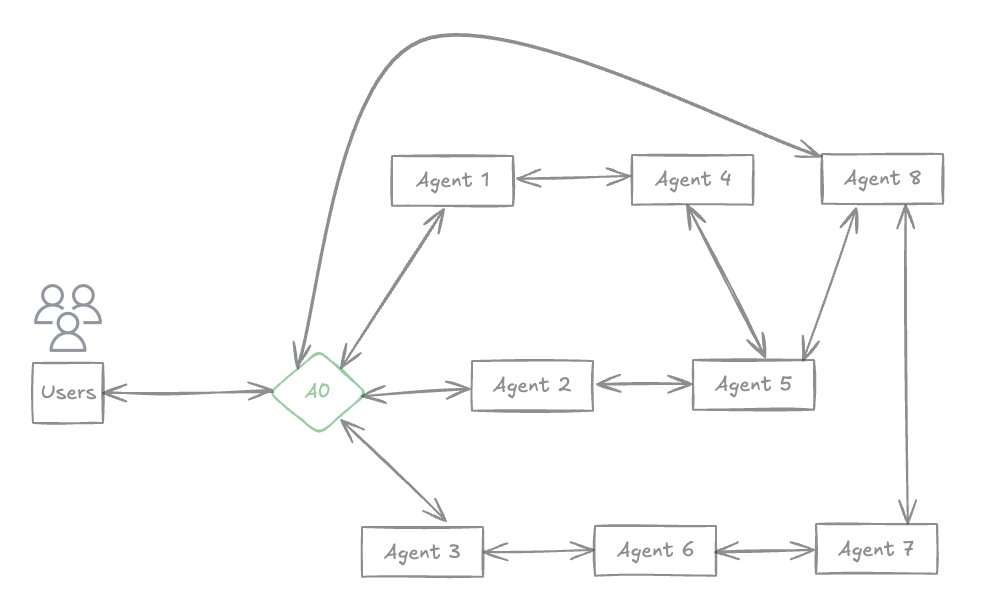
Figure 6: the workflow agent pattern. A directed acyclic graph of agents executing a multi-step process. In this example, A0 (entry point) splits the query into three agents (to Agents 1, 2, 3), which then feed into subsequent steps (Agents 4, 5, 6, 7), and finally converge at Agent 8 which produces the response. This illustrates explicit task dependencies and execution order forming a workflow.
You can think of an agent workflow as a directed acyclic graph (DAG) of tasks, where each task is executed by an agent. This is similar to an agent graph, but workflow typically implies a stronger focus on one-off execution of a process from start to finish (like a pipeline run), whereas an agent graph might be a persistent network of agents handling ongoing tasks. Workflows are great for processes that have clear stage-wise structure–for example, data processing pipelines, multi-step reasoning with checkpoints, or any situation where certain steps (tasks) must happen in a strict order or only after certain prerequisites are met. The workflow pattern also aligns well with systems that require monitoring, logging, or error recovery at each step of a complex job (since each task’s execution can be tracked independently).
Use cases, pros, and cons
Use agent workflows when dealing with complex multi-step tasks with well-defined stages:
- Content generation with review: One agent drafts an article, another agent (or tool) fact-checks it, another agent edits for style, and another approves or publishes. These steps happen in order (possibly with some parallel checks) and might be repeated on failure.
- Situations requiring coordination and dependency handling: If certain tasks can run in parallel, the workflow can branch; if some tasks must converge, the workflow can join. For example, a job application screening might have one AI agent score the resumé and another agent perform a skill test in parallel, then a final agent uses both outcomes to make a decision.
- Long-running or monitored processes: With workflows, you can pause, resume, or retry at the task level. If a particular agent fails or a step needs to be repeated, you can reset that step without redoing the whole workflow–useful for robust production pipelines.
Pros:
- Clear structure and reliability: The explicit definition of order and dependencies means that the execution path is predictable and repeatable. This is vital for processes where correctness and auditability matter (you can log each step’s input and output).
- Parallel efficiency: Workflows can specify parallel branches for independent tasks, making better use of resources (unlike a single agent doing everything sequentially). The framework will synchronize when branches need to join.
- Error handling and recovery: Because tasks are discrete, a workflow controller can catch if an agent fails on a step and implement a retry or fallback just for that step. There’s no need to restart the entire process. This localized error handling improves robustness.
- Specialized agents per step: Similar to Agents as Tools, each step can use an agent best suited for that subtask (for example, a translation agent followed by a summarizer agent). Workflows ensure these specialized agents run in the correct sequence with the proper data.
- State management: The workflow can maintain state context across steps explicitly (such as carrying forward a task ID or collecting outputs). Strands’ workflow tool supports tracking progress, pausing, and even resuming workflows that persist beyond a single session.
Cons:
- Less flexibility for novel situations: A workflow handles expected sequences well, but if a user query doesn’t fit the pre-defined process, the system might not adapt. It’s not as exploratory as a swarm or as dynamically routed as an agent graph. Essentially, workflows are only as smart as the predefined flow.
- Up-front effort: You need to decompose the task and define the dependencies. If this analysis is wrong or incomplete, the workflow might fail or produce suboptimal results. Designing a good workflow might require domain expertise to decide the correct breakdown.
- Potential under-utilization: If a workflow has many sequential steps, it could be slower than an agent that can perform some steps in parallel. For example, a single large language model might internally summarize while reading text, whereas a strictly sequential workflow forces a full hand-off between reading and summarizing agents, possibly incurring overhead.
- Overhead of orchestration: Managing the execution of multiple agents (especially with a general workflow engine) introduces overhead. In simple cases, a single agent might achieve the goal with prompt engineering. Workflows shine in complex scenarios, but for trivial tasks the orchestration overhead is unnecessary.
Strands SDK example
The Strands Agent SDK doesn’t enforce a strict conversation among all agents–you have to program the flow–but its minimal abstractions make parallel or sequential orchestration straightforward (as seen in the previous example running three poet agents in parallel with plain Python async code). Another advantage of using Strands Agent SDK is the hierarchical agent concept: using the @tool decorator, you can build a hierarchy of agents naturally, as shown earlier, making it intuitive to implement the manager/sub-agent pattern. Let’s illustrate a simple manual workflow: three agents (researcher, analyst, writer) performing a sequence of steps.
In this code, we explicitly call each agent in turn, passing the output of one as the input to the next. The process_workflow function orchestrates the sequence. If the researcher agent returns a large amount of data, we might refine or truncate it before passing to the analyst agent, and so on, but the pattern is clear: a linear hand-off.
One great working example of agentic workflow is intelligent document processing (IDP) workflow. An IDP workflow is a great example of an agentic workflow because it naturally involves multiple discrete yet interdependent steps that benefit from task-specialized agents, dynamic coordination, and adaptive decision-making. The code sample of a typical IDP workflow is provided in this solution guidance.
See the workflows documentation for more information.
Conclusion
Multi-agent collaboration unlocks generative AI capabilities that a single model cannot match—especially when each agent can draw on Amazon Nova’s low-latency, low-cost token generation and coordinate seamlessly through the open-source Strands Agents SDK. Nova’s ultra-low pricing—fractions of a cent per thousand tokens—combined with high throughput of over 200 tokens per second means teams can experiment freely with deeper reasoning loops, redundancy, and tool use without worrying about runaway costs. Strands adds just-enough orchestration: a Pythonic API for Agents as Tools, swarms, graphs, and workflow patterns, integrated Bedrock model wrappers, shared memory for context exchange, and built-in telemetry. Whether you are building a multimodal Q&A system, an autonomous document-processing pipeline, or a creative brainstorming assistant, pairing Amazon Nova with Strands helps you scale from a single prototype agent to production-grade multi-agent architectures—all while maintaining the speed, accuracy, and cost profile demanded by modern enterprise workloads. Now is the ideal time to apply these patterns and watch your generative AI applications achieve results that truly are greater than the sum of their Nova-powered parts.
About the authors
 Julia Hu Julia Hu is a Sr. AI/ML Solutions Architect at Amazon Web Services, currently focused on the Amazon Bedrock team. Her core expertise lies in agentic AI, where she explores the capabilities of foundation models and AI agents to drive productivity in Generative AI applications. With a background in Generative AI, Applied Data Science, and IoT architecture, she partners with customers—from startups to large enterprises—to design and deploy impactful AI solutions.
 Rui Cardoso is a partner solutions architect at Amazon Web Services (AWS). He is focusing on AI/ML and IoT. He works with AWS Partners and support them in developing solutions in AWS. When not working, he enjoys cycling, hiking and learning new things.
 Jessie-Lee Fry is a Product and Go-to Market (GTM) Strategy executive specializing in Generative AI and Machine Learning, with over 15 years of global leadership experience in Strategy, Product, Customer success, Business Development, Business Transformation and Strategic Partnerships. Jessie has defined and delivered a broad range of products and cross-industry go- to-market strategies driving business growth, while maneuvering market complexities and C-Suite customer groups. In her current role, Jessie and her team focus on helping AWS customers adopt Amazon Bedrock at scale enterprise use cases and adoption frameworks, meeting customers where they are in their Generative AI Journey.
 Bhavya Sruthi Sode is a Technical Account Manager at Amazon Web Services, focused on Generative AI and Machine Learning. She helps customers design resilient, scalable, and secure cloud architectures while driving successful outcomes in their enterprise cloud environments. With a background in Machine Learning, she is passionate about helping organizations transform their AI aspirations into practical solutions.
 David Rostcheck is a Sr. Specialist Solutions Architect at Amazon Web Services, focused on AI/ML, Bedrock, and agent solutions. He enjoys helping our customers deliver effective AI-based solutions to production.