Today, we are excited to announce the public preview of support for inline code nodes in Amazon Bedrock Flows. With this powerful new capability, you can write Python scripts directly within your workflow, alleviating the need for separate AWS Lambda functions for simple logic. This feature streamlines preprocessing and postprocessing tasks (like data normalization and response formatting), simplifying generative AI application development and making it more accessible across organizations. By removing adoption barriers and reducing maintenance overhead, the inline code feature accelerates enterprise adoption of generative AI solutions, resulting in faster iteration cycles and broader participation in AI application building.
Organizations using Amazon Bedrock Flows now can use inline code nodes to design and deploy workflows for building more scalable and efficient generative AI applications fully within the Amazon Bedrock environment while achieving the following:
- Preprocessing – Transforming input data before sending it to a large language model (LLM) without having to set up a separate Lambda function. For example, extracting specific fields from JSON, formatting text data, or normalizing values.
- Postprocessing – Performing operations on model outputs directly within the flow. For example, extracting entities from responses, formatting JSON for downstream systems, or applying business rules to the results.
- Complex use cases – Managing the execution of complex, multi-step generative AI workflows that can call popular packages like opencv, scipy, of pypdf.
- Builder-friendly – Creating and managing inline code through both the Amazon Bedrock API and the AWS Management Console.
- Observability – Seamless user experience with the ability to trace the inputs and outputs from each node.
In this post, we discuss the benefits of this new feature, and show how to use inline code nodes in Amazon Bedrock Flows.
Benefits of inline code in Amazon Bedrock Flows
Thomson Reuters, a global information services company providing essential news, insights, and technology solutions to professionals across legal, tax, accounting, media, and corporate sectors, handles complex, multi-step generative AI use cases that require simple preprocessing and postprocessing as part of the workflow. With the inline code feature in Amazon Bedrock Flows, Thomson Reuters can now benefit from the following:
- Simplified flow management – Alleviate the need to create and maintain individual Lambda functions for each custom code block, making it straightforward to manage thousands of workflows across a large user base (over 16,000 users and 6,000 chains) with less operational overhead.
- Flexible data processing – Enable direct preprocessing of data before LLM calls and postprocessing of LLM responses, including the ability to interact with internal AWS services and third-party APIs through a single interface.
- DIY flow creation – Help users build complex workflows with custom code blocks through a self-service interface, without exposing them to the underlying infrastructure complexities or requiring Lambda function management.
Solution overview
In the following sections, we show how to create a simple Amazon Bedrock flow and add inline code nodes. Our example showcases a practical application where we’ll construct a flow that processes user requests for music playlists, incorporating both preprocessing and postprocessing inline code nodes to handle data validation and response formatting.
Prerequisites
Before implementing the new capabilities, make sure you have the following:
- An AWS account
- Other Amazon Bedrock services in place:
- Create and test your base prompts for customer service interactions in Amazon Bedrock Prompt Management
- Create guardrails with relevant rules using Amazon Bedrock Guardrails
- Resources in auxiliary AWS services needed for your workflow, such as Amazon DynamoDB, Amazon Simple Storage Service (Amazon S3), and Amazon Simple Notification Service (Amazon SNS)
- Required AWS Identity and Access Management (IAM) permissions:
After these components are in place, you can proceed with using Amazon Bedrock Flows with inline code capabilities in your generative AI use case.
Create your flow using inline code nodes
Complete the following steps to create your flow:
- On the Amazon Bedrock console, choose Flows under Builder tools in the navigation pane.
- Create a new flow, for example, easy-inline-code-flow. For detailed instructions on creating a flow, see Amazon Bedrock Flows is now generally available with enhanced safety and traceability.
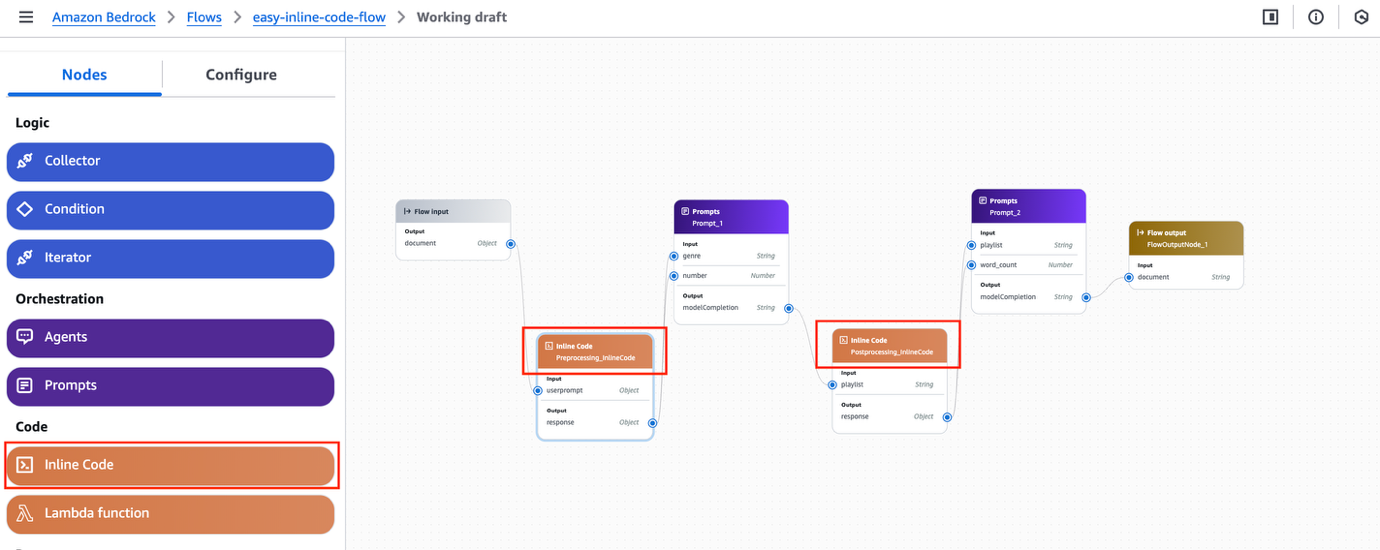
- Add an inline code node. (For this example, we create two nodes for two separate prompts).
Amazon Bedrock provides different node types to build your prompt flow. For this example, we use an inline code node instead of calling a Lambda function for custom code for a generative AI-powered application. There are two inline code nodes in the flow. We have extended the sample from the documentation Create a flow with a single prompt. The new node type Inline Code is on the Nodes tab in the left pane.
- Add some code to process in the
Preprocessing_InlineCodenode before sending it to the prompt nodeprompt_1. Python 3 is only supported at the time of writing. In this example, we check if the number of songs requested by the user is more than 10 and it’s set to 10.
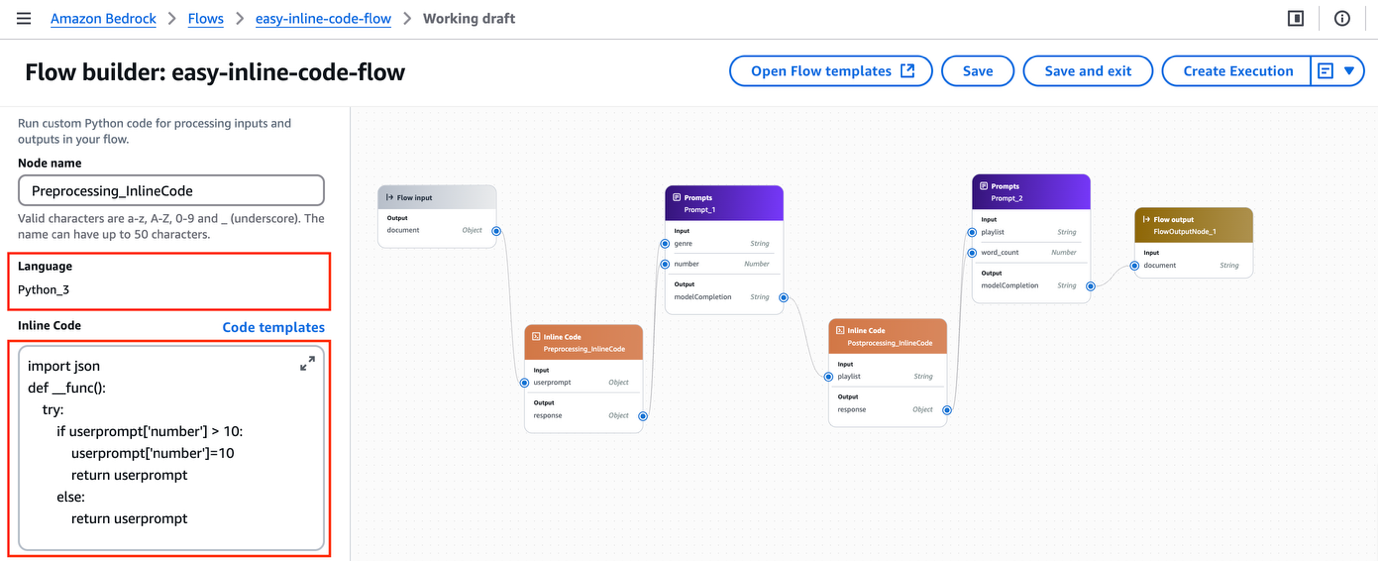
There is a Python code editor and sample code templates as well for writing the code.
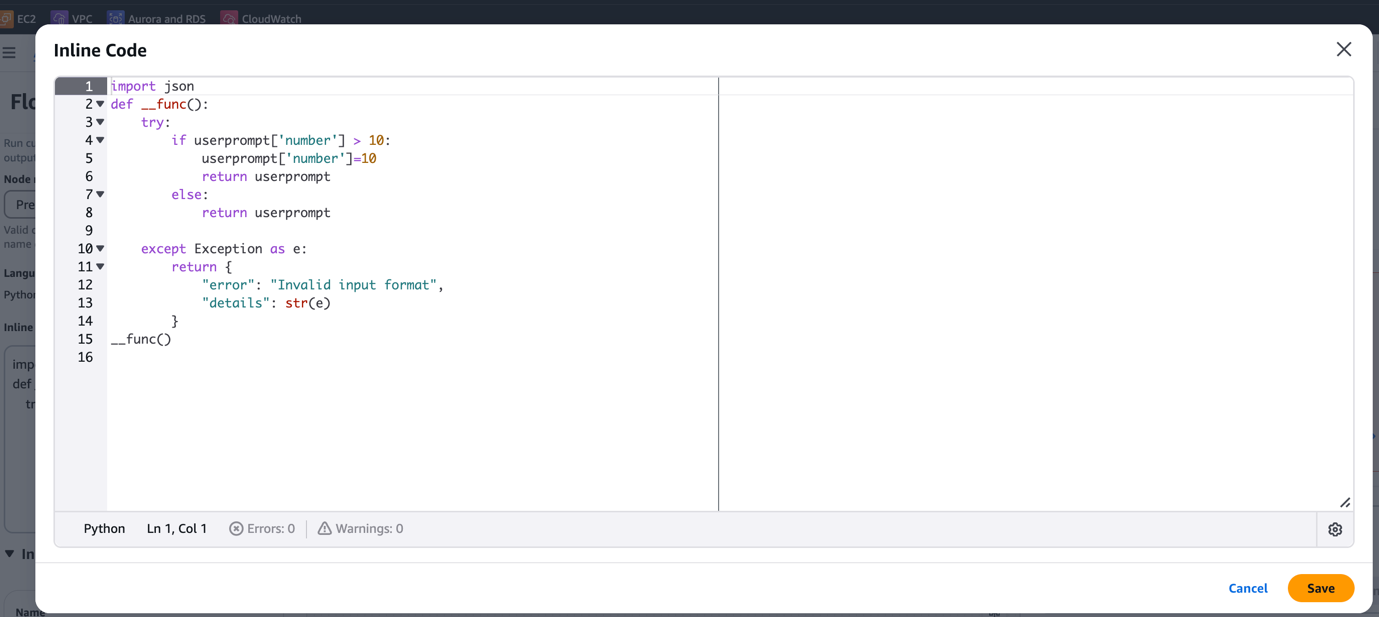
We use the following code:
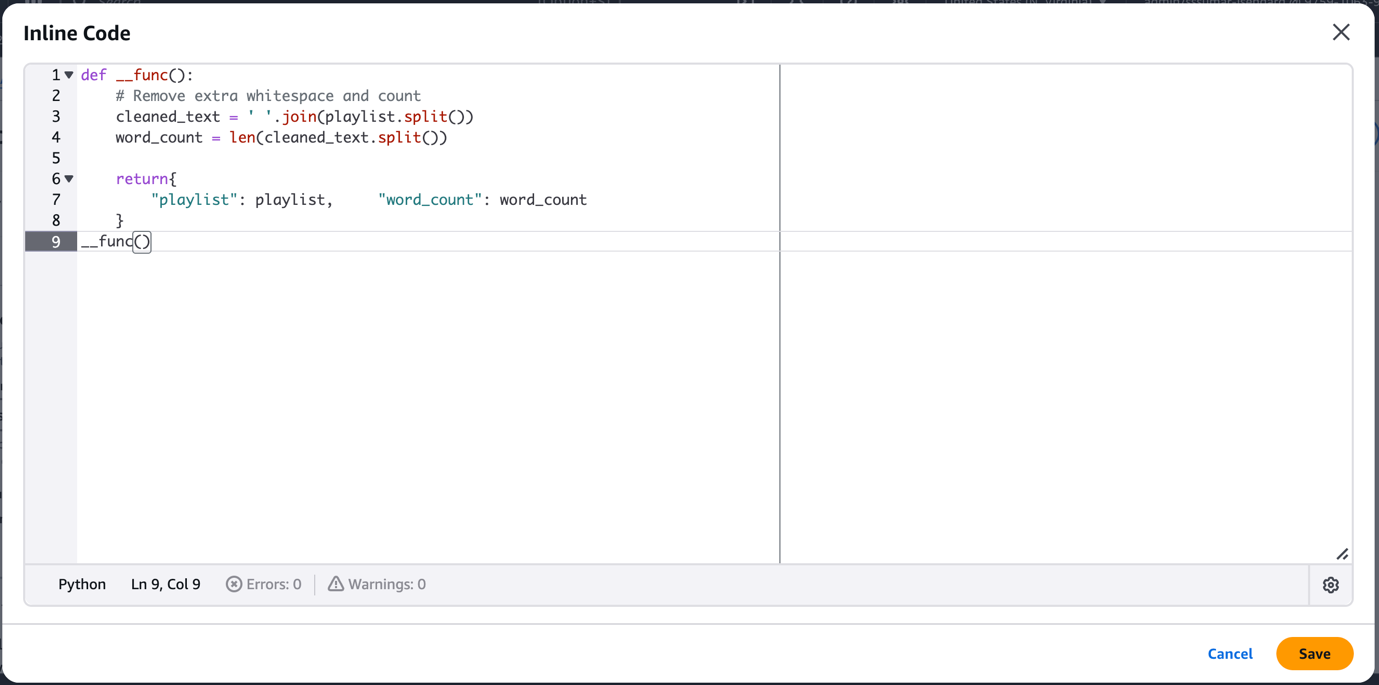
- In the Postprocessing_Inline Code node, we check the number of words in the response and feed the data to the next prompt node,
prompt_2.
- Test the flow with the following prompt:
Input to the inline code node (Python function) must be treated as untrusted user input, and appropriate parsing, validation, and data handling should be implemented.
You can see the output as shown in the following screenshot. The system also provides access to node execution traces, offering detailed insights into each processing step, real-time performance metrics, and highlighting any issues that occurred during the flow’s execution. Traces can be enabled using an API and sent to an Amazon CloudWatch log. In the API, set the enableTrace field to true in an InvokeFlow request. Each flowOutputEvent in the response is returned alongside a flowTraceEvent.
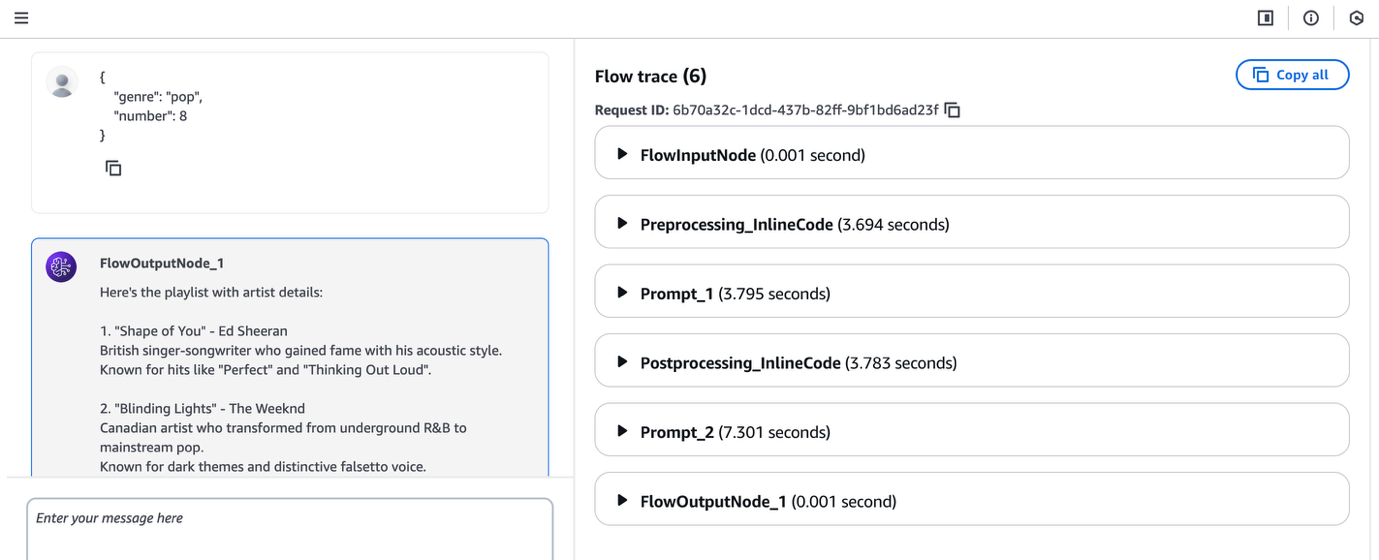
You have now successfully created and executed an Amazon Bedrock flows using inline code nodes. You can also use Amazon Bedrock APIs to programmatically execute this flow. For additional details on how to configure flows with enhanced safety and traceability, see Amazon Bedrock Flows is now generally available with enhanced safety and traceability.
Considerations
When working with inline code nodes in Amazon Bedrock Flows, the following are the important things to note:
- Code is executed in an AWS managed, secured, sandbox environment that is not shared with anyone and doesn’t have internet access
- The feature supports Python 3.12 and above
- It efficiently handles code with binary size up to 4 MB, which is roughly 4 million characters
- It supports popular packages like opencv, scipy, and pypdf
- It supports 25 concurrent code execution sessions per AWS account
Conclusion
The integration of inline code nodes in Amazon Bedrock Flows marks a significant advancement in democratizing generative AI development, reducing the complexity of managing separate Lambda functions for basic processing tasks. This enhancement responds directly to enterprise customers’ needs for a more streamlined development experience, helping developers focus on building sophisticated AI workflows rather than managing infrastructure.
Inline code in Amazon Bedrock Flows is now available in public preview in the following AWS Regions: US East (N. Virginia, Ohio), US West (Oregon) and Europe (Frankfurt). To get started, open the Amazon Bedrock console or Amazon Bedrock APIs to begin building flows with Amazon Bedrock Flows. To learn more, refer to Create your first flow in Amazon Bedrock and Track each step in your flow by viewing its trace in Amazon Bedrock.
We’re excited to see the innovative applications you will build with these new capabilities. As always, we welcome your feedback through AWS re:Post for Amazon Bedrock or your usual AWS contacts. Join the generative AI builder community at community.aws to share your experiences and learn from others.
About the authors
 Shubhankar Sumar is a Senior Solutions Architect at AWS, where he specializes in architecting generative AI-powered solutions for enterprise software and SaaS companies across the UK. With a strong background in software engineering, Shubhankar excels at designing secure, scalable, and cost-effective multi-tenant systems on the cloud. His expertise lies in seamlessly integrating cutting-edge generative AI capabilities into existing SaaS applications, helping customers stay at the forefront of technological innovation.
 Jesse Manders is a Senior Product Manager on Amazon Bedrock, the AWS Generative AI developer service. He works at the intersection of AI and human interaction with the goal of creating and improving generative AI products and services to meet our needs. Previously, Jesse held engineering team leadership roles at Apple and Lumileds, and was a senior scientist in a Silicon Valley startup. He has an M.S. and Ph.D. from the University of Florida, and an MBA from the University of California, Berkeley, Haas School of Business.