As an Amazon Web Services (AWS) enterprise customer, you’re probably exploring ways to use generative AI to enhance your business processes, improve customer experiences, and drive innovation.
With a variety of options available—from Amazon Q Business to other AWS services or third-party offerings—choosing the right tool for your use case can be challenging. This post aims to guide you through the decision-making process and highlight the unique advantages of Amazon Q Business and how to build an AWS architecture to get started and onboard more use cases.
Amazon Q Business is an AI-powered assistant that can help employees quickly find information, solve problems, and get work done across their company’s data and applications. With Amazon Q Business, employees can access information from various internal documents, websites, wikis, and other business resources through natural conversations, helping them to find exactly what they need without extensive searching. It can also be used to automate common workflows across enterprise systems. Amazon Q Business prioritizes security and privacy by operating within your organization’s existing permissions and access controls, helping to ensure that employees only see information that they’re authorized to access.
Understand your use case
The first step in selecting the right generative AI solution is to clearly define your use case. Are you looking to enhance a single system, or do you need a solution that spans multiple platforms? Single-system use cases might be well-served by specific generative AI solutions, while cross-system scenarios often benefit from a more unified approach. Organizations that benefit most from Amazon Q Business typically share several key characteristics:
- Data complexity: Companies with large volumes of data spread across multiple repositories and formats (documents, images, audio, video)
- Knowledge dependency: Organizations where employee productivity depends on accessing institutional knowledge quickly and accurately
- Security requirements: Organizations with strict security and compliance needs requiring role-based permissions and access controls
- Collaboration needs: Teams that need to share information and collaborate across departments and geographies
- Process complexity: Organizations with complex workflows that could benefit from automation and streamlining
Key considerations for tool selection
When evaluating generative AI tools, there are several factors should you should consider to help ensure successful implementation and adoption:
- Customization needs: Determine if you need custom AI behaviors or if out-of-the-box solutions suffice
- Integration complexity: Assess the number of systems involved and the complexity of data flows between them
- Future scalability: Think about your long-term needs and choose a solution that can grow with you
- Data privacy and residency: Understand your data governance requirements and make sure that your chosen solution can meet them
- Cost-effectiveness: Evaluate the total cost of ownership, including implementation, maintenance, and scaling costs
- Time to market: Consider how quickly you need to implement your generative AI solution
- Change management: As with any enterprise AI implementation, organizations must invest in proper training and change management strategies to help ensure adoption
The case for Amazon Q Business
Amazon Q Business offers unique advantages, especially for organizations that already have AWS services or that have complex, cross-system needs. For AWS enterprise customers that have the resources to build and operate their own solutions, an architecture that includes Amazon Q Business offers flexibility and cost advantages, including:
- Unified experience: Amazon Q Business can provide a consistent AI experience across multiple systems, creating a seamless interface for users.
- Architectural benefits: As a native AWS service, Amazon Q Business integrates seamlessly with your existing AWS architecture, reducing complexity and potential points of failure.
- Flexibility: Amazon Q Business can connect to various enterprise systems, so that you can use it to create custom workflows that span multiple platforms.
- Scalability: By using Amazon Q Business, you can take advantage of the proven scalability of AWS to handle growing workloads without worrying about infrastructure management.
- Security and compliance: Use the robust security features and compliance certifications of AWS to help reduce your security and compliance burden.
- Cost advantages: Amazon Q Business offers a pay-as-you-go model, so you can scale costs with the number of users and usage for knowledge bases. This can lead to significant cost savings (see pricing details).
Implement your generative AI use cases
After you’ve chosen your generative AI use cases, consider a phased implementation approach:
- Start with pilot use cases to prove value quickly: Good pilot use cases include IT help desk or HR workflows. You can get started by taking advantage of AWS-provided example projects and open source samples.
- Evaluate the next use cases: Prioritize you next use cases by business impact and feature coverage with existing Amazon Q Business connectors and plugins. Often AIOps use cases that include integrations or chat interfaces on top of ServiceNow, Confluence, Teams, or Slack are good examples.
- Use existing data sources: Connect Amazon Q Business to enterprise systems with supported connectors first to maximize immediate value.
- Implement accuracy testing using frameworks: Use tools such as the AWS evaluation framework for Amazon Q Business, which includes automated testing pipelines, ground truth datasets, and comprehensive metrics for measuring response quality, relevancy, truthfulness, and overall accuracy.
- Iteratively scale successful implementations across your organization: Start your implementation with the teams that are most interested in the application and willing to provide feedback. Make changes based on the feedback as needed, then expand it across the organization.
- Measure and track results: Establish clear KPIs before implementation to quantify business impact.
Monitor usage and costs, implement feedback loops, and make sure to support security and compliance throughout your generative AI journey. Amazon Q Business can provide significant value when implemented in appropriate use cases with proper planning and governance. Success depends on careful evaluation of business needs, thorough implementation planning, and ongoing management of the solution.
Get started on AWS
When implementing your generative AI use cases, architectural decisions play a crucial role in achieving long-term success. Let’s explore some best practices for a typical AWS enterprise environment.
- AWS Identity and Access Management (IAM): Connecting your corporate source of identities to AWS IAM Identity Center provides better security and user experience, Amazon Q Business users authorize their Amazon Q session with their usual sign-in process, using their existing organizational credentials through the identity source already in place.
- Account structure: Set up Amazon Q Business service, data sources, and plugins in a shared services account based on application group or business unit to help reduce the number of similar deployments across different AWS accounts.
- Access channels: When rolling out new use cases, consider also enabling existing familiar enterprise channels such as collaboration tools (Teams or Slack) to provide a frictionless way to test and roll out new use cases.
- Data sources: When adding data sources, estimate index storage needs and whether your use case requires crawling access control list (ACL) and identity information from the data source and if it is supported by the connector. To reduce initial complexity, focus on use cases that provide the same data to all users, then expand it in a second phase for use cases that rely on ACLs to control access.
- Plugins: Use plugins to integrate external services as actions. For each use case, verify if a built-in plugin can provide this functionality, or if a custom plugin is needed. For custom plugins, plan an architecture that enables pointing to backend services using OpenAPI endpoints in other AWS accounts across the organization. This allows flexible integration of existing AWS Lambda functions or container-based functionality.
By carefully considering these aspects, you can create a solid foundation for your generative AI implementation that aligns with your organization’s needs and future growth plans.
How to deploy Amazon Q Business in your organization
The following reference architecture illustrates the main components and flow of a typical Amazon Q Business implementation:
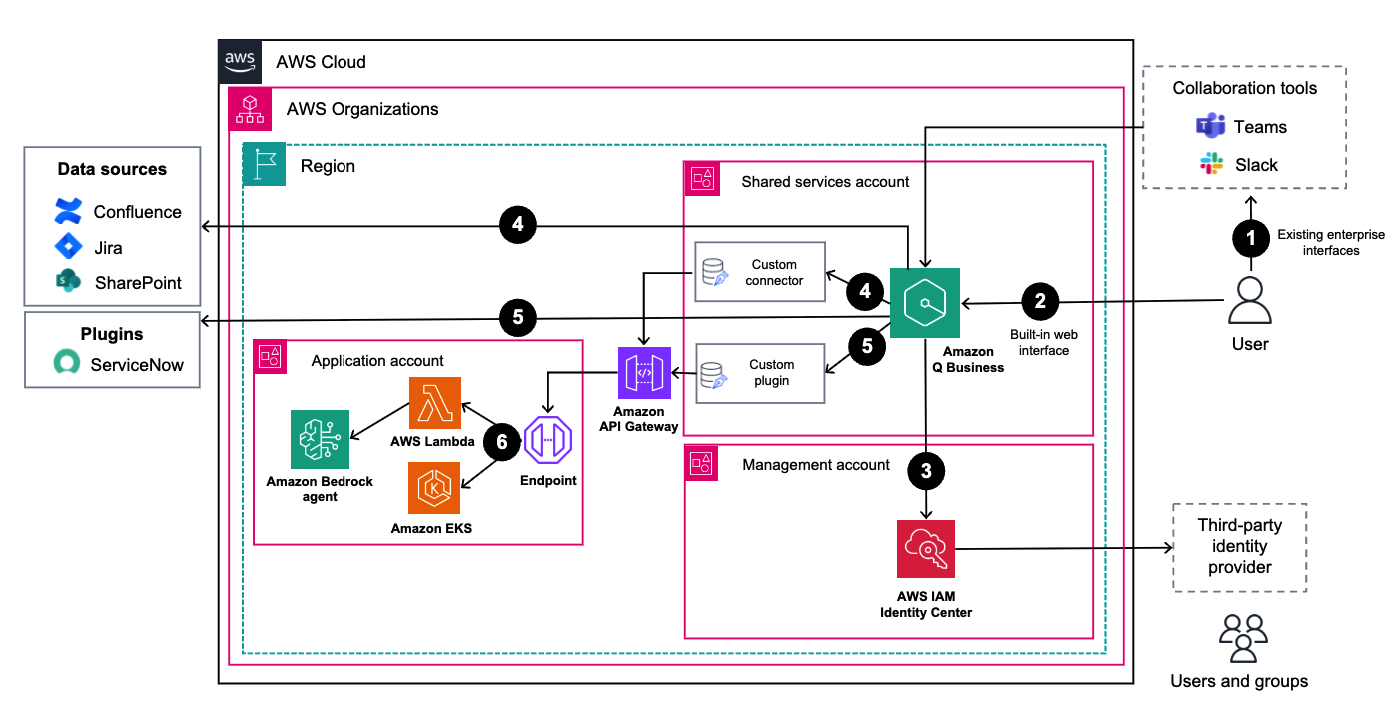
The workflow is as follows:
- A user interacts with an assistant through an enterprise collaboration system.
- Alternate: A user interacts with the built-in web interface provided by Amazon Q Business.
- The user is authenticated using IAM Identity Center and federated by a third-party identity provider (IdP).
- Data sources are configured for existing enterprise systems and data is crawled and indexed in Amazon Q Business. You can use custom connectors to integrate data sources that aren’t provided by Amazon Q Business.
- The user makes a request that requires action through a custom plugin. Use custom plugins to integrate third-party applications.
- The custom plugin calls an API endpoint that calls an Amazon Bedrock agent using Lambda or Amazon Elastic Kubernetes Service (Amazon EKS) in another AWS account. The response is returned to Amazon Q Business and the user.
Use Amazon Q Business to improve enterprise productivity
Amazon Q Business, offers numerous practical applications across enterprise functions. Let’s explore some of the key use cases where Amazon Q Business can enhance organizational efficiency and productivity.
- Knowledge management and support: Amazon Q Business can manage and retrieve information from documentation and repositories such as internal wikis, SharePoint, Confluence, and other knowledge bases. It provides contextual answers through natural language queries and helps maintain documentation quality by suggesting updates while connecting related information across different repositories. For examples, see Smartsheet enhances productivity with Amazon Q Business.
- Employee onboarding and training: Improve your employee onboarding experience with automated, personalized learning journeys powered by intelligent support. From instant answers to common questions to guided system setup and interactive training content, this solution helps integrate new team members while supporting their continuous learning and development. To learn more, see Deriv Boosts Productivity and Reduces Onboarding Time by 45% with Amazon Q Business and this Amazon Machine Learning blog post.
- IT help desk support: Shorten IT response times by using AI-driven assistance that delivers round-the-clock support and intelligent troubleshooting guidance. By automating ticket management and using historical data for solution recommendations, this system dramatically reduces response times while easing the burden on your IT support teams.
- Human resources: Support your HR operations and increase employee satisfaction with an AI-powered solution that provides quick answers to policy questions and streamlines benefits management. This intelligent assistant guides employees through HR processes, simplifies leave management, and offers quick access to essential forms and documents, creating a more efficient and user-friendly HR experience.
- Sales and marketing: Strengthen your sales and marketing efforts with an AI-powered platform that streamlines content creation, market analysis, and proposal development. From generating fresh content ideas to quickly providing product information and competitor insights, teams can use this solution to respond faster to customer needs while making data-driven decisions. See How AWS sales uses Amazon Q Business for customer engagement.
- AI operations: Upgrade and improve your operational workflow with AI-driven monitoring and automation that transforms system management and incident response. From real-time performance tracking to automated routine tasks and intelligent root cause analysis, teams can use this solution to maintain operational efficiency and reduce manual intervention.
Customer case study
A leading enterprise organization transformed its operational efficiency by implementing Amazon Q Business to tackle widespread knowledge accessibility challenges. Prior to implementation, the company struggled with fragmented institutional knowledge scattered across multiple systems, causing significant productivity losses as employees—from systems analysts to executives—spent hours daily searching through documentation, legacy code, and reports.
By deploying Amazon Q Business, the organization centralized its scattered information from various sources including Amazon Simple Storage Service (Amazon S3) buckets, Jira, SharePoint, and other content management systems into a single, intelligent interface. The solution dramatically streamlined access to critical information across their complex ecosystem of enterprise resource planning (ERP) systems, databases, sales platforms, and e-commerce integrations.
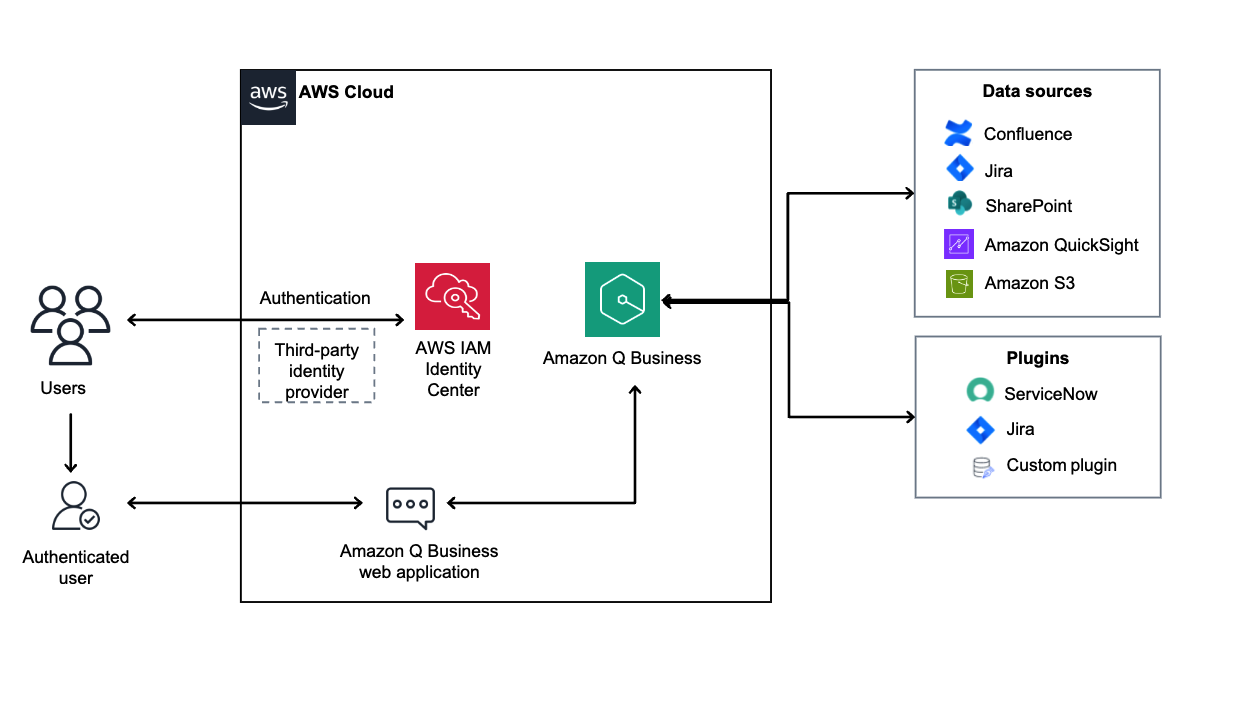
With approximately 300 employees each saving two hours daily on routine information retrieval tasks, the company achieved remarkable productivity and efficiency gains. Beyond the gains, Amazon Q Business fostered smarter collaboration, reduced subject-matter expert (SME) dependencies, and accelerated decision-making processes, effectively redefining how enterprise knowledge is accessed and used across the organization.
Conclusion
Amazon Q Business offers AWS customers a scalable and comprehensive solution for enhancing business processes across their organization. By carefully evaluating your use cases, following implementation best practices, and using the architectural guidance provided in this post, you can deploy Amazon Q Business to transform your enterprise productivity. The key to success lies in starting small, proving value quickly, and scaling systematically across your organization.
For more information on Amazon Q Business, including detailed documentation and getting started guides, visit:
- Explore the Amazon Q documentation to understand more about building custom plugins.
- Check out these related resources:
For questions and feedback, visit the AWS re:Post or contact AWS Support.
About the authors
 Oliver Steffmann is a Principal Solutions Architect at AWS based in New York and is passionate about GenAI and public blockchain use cases. He has over 20 years of experience working with financial institutions and helps his customers get their cloud transformation off the ground. Outside of work he enjoys spending time with his family and training for the next Ironman.
 Krishna Pramod is a Senior Solutions Architect at AWS. He works as a trusted advisor for customers, guiding them through innovation with modern technologies and development of well-architected applications in the AWS cloud. Outside of work, Krishna enjoys reading, music and exploring new destinations.
 Mo Naqvi is a Generative AI Specialist at AWS on the Amazon Q Business team, where he helps enterprise customers leverage generative AI to transform workplace productivity and unlock business intelligence. With expertise in AI-powered search, deep research capabilities, and agentic workflows, he enables organizations to break down data silos and derive actionable insights from their enterprise information.